
Subiq
Subiq gives small teams one place to track subscriptions, manage spend, and eliminate surprise costs from unused software.
Visit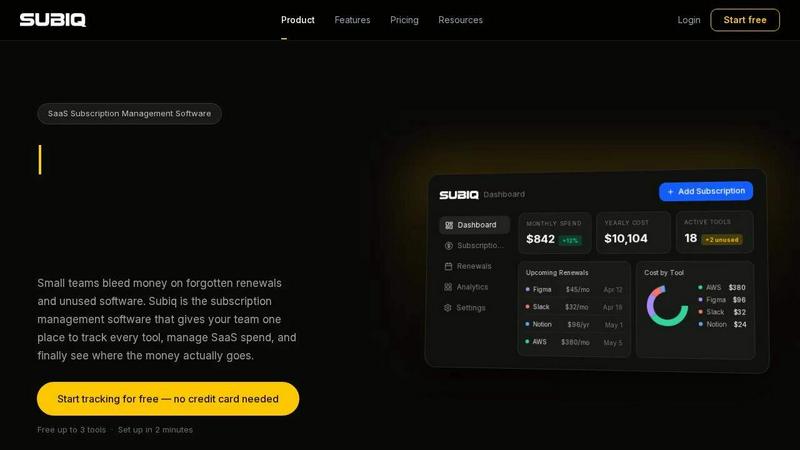
About Subiq
Subiq is a dedicated SaaS subscription management software designed specifically for small teams that need to regain control over their software spending. In today's fast-paced business environment, teams add new tools rapidly to solve immediate problems, but they rarely cancel subscriptions with the same speed. This leads to a common and costly problem: forgotten renewals, unused licenses, and a steady bleed of money to tools nobody uses anymore. Subiq solves this by providing a single, centralized dashboard where teams can track every subscription, monitor monthly and yearly costs, and receive timely alerts before renewals hit. The platform replaces the chaos of scattered spreadsheets, inbox notes, and memory-based tracking with a clear, organized system. Users can add their tools, invite team members, and set up automated review requests on a monthly or quarterly basis. During these reviews, team members simply confirm which tools they actively use, flag those they do not, and mark subscriptions as active, unused, or cancelled. Subiq then calculates potential savings automatically, giving teams actionable insights to cut dead weight and optimize their SaaS spend. Built for small teams tired of surprises, Subiq offers a free plan for up to three tools, making it accessible for startups and small businesses to start managing their software costs immediately without any upfront investment.
Features of Subiq
Full Spend Dashboard
The full spend dashboard provides an at-a-glance view of your entire SaaS ecosystem. It displays total monthly spend, yearly cost projections, and the number of active tools, all updated in real-time as you add or modify subscriptions. Each tool is broken down individually, showing its cost contribution so you can instantly identify which subscriptions are driving the majority of your expenses. This eliminates the need for manual formulas or spreadsheet updates, giving you a reliable and always-current financial picture.
Renewal Calendar and Alerts
Subiq features a visual renewal calendar that maps every upcoming subscription renewal on a clear timeline. You can set customizable alerts days or weeks before a charge is scheduled to hit your account. This proactive notification system ensures you have enough time to decide whether to renew, downgrade, cancel, or renegotiate a contract. Instead of discovering unexpected charges on your bank statement, you maintain full control over every renewal decision.
Team Invites and Roles
The platform supports collaborative management by allowing you to invite team members directly from the dashboard. Each member sees their own assigned tools and subscriptions, while administrators have a comprehensive view of the entire stack. This role-based access creates a single shared source of truth, replacing the scattered knowledge that exists across different inboxes and personal spreadsheets. It ensures that everyone is aligned and accountable for the tools they use.
Automated Review Requests
Subiq automates the process of keeping your subscription data accurate and up-to-date. You can schedule recurring check-ins on a monthly or quarterly basis. The system automatically sends review requests to team members, who can then confirm which tools they are actively using with a single click. This eliminates the need for chasing people, scheduling meetings, or relying on guesswork, making software license management effortless and consistent.
Use Cases of Subiq
Managing Forgotten Annual Renewals
A common pain point for small teams is the surprise of an annual renewal for a tool that is no longer needed. Subiq solves this by sending renewal alerts well before the charge date. A marketing team, for example, can set alerts for their annual design software subscription. When the alert arrives, they can review usage data, decide to cancel if the tool is no longer essential, and avoid a thousand-dollar charge that would have otherwise gone unnoticed.
Eliminating Ghost Seats and Unused Licenses
Many teams pay for more software seats than they actually use. This happens when team members leave or change roles, but their licenses remain active. Subiq’s automated review requests help solve this. During a quarterly check-in, each team member marks their tools as active or unused. The administrator can then see exactly how many licenses are wasted and cancel the unnecessary ones, directly reducing monthly software spend without impacting productivity.
Centralizing a Disorganized Software Stack
When different team members sign up for different tools using their own accounts and payment methods, no one has a full picture of the company’s software stack. Subiq provides a central repository where all subscriptions are logged. A small business owner can invite their entire team, and within minutes, every tool used by the company is visible in one dashboard. This eliminates the chaos of tracking subscriptions through emails and personal notes.
Conducting Periodic Software Audits
Subiq facilitates regular software audits by scheduling automated review requests. A finance manager can set up monthly check-ins where the team confirms tool usage. The system then calculates possible savings based on which tools are marked as unused or cancelled. This structured approach turns a once-tedious manual audit into a quick, recurring process that continuously optimizes the company’s SaaS spend and ensures every dollar spent adds value.
Frequently Asked Questions
How does Subiq help me save money on SaaS subscriptions?
Subiq saves you money by providing full visibility into your software spending and by alerting you before renewals occur. It also enables your team to regularly review which tools are actively used. By identifying and cancelling unused subscriptions or reducing unnecessary licenses, you can directly lower your monthly and yearly software costs. The platform calculates potential savings automatically, showing you exactly how much you could save by cutting dead weight.
Is Subiq suitable for a very small team with only a few tools?
Yes, Subiq is specifically built for small teams. The platform offers a free plan that supports up to three tools, making it ideal for startups and very small teams just beginning to manage their subscriptions. As your team grows and adds more tools, you can upgrade to a paid plan to track an unlimited number of subscriptions. The setup process is quick, taking approximately two minutes, and no credit card is required to start.
Can I invite my entire team to use Subiq?
Absolutely. Subiq includes team invite and role management features. You can invite team members directly from the dashboard. Each member will see their own assigned tools, while administrators have a comprehensive view of the entire company’s software stack. This collaborative approach ensures everyone is aligned and accountable, creating a single source of truth for all subscription data.
How do the automated review requests work?
You can schedule automated review requests on a monthly or quarterly basis from your Subiq dashboard. The system will then send notifications to your team members asking them to confirm which tools they are actively using. Each member can mark a subscription as active, unused, or cancelled with a single click. This eliminates the need for manual follow-ups and meetings, making the process of keeping your subscription data accurate effortless and consistent.
Similar to Subiq
Wisegrid
Wisegrid helps project-driven teams manage projects, workflows, resources, and reporting in a familiar spreadsheet-style workspace.
Owl Insight
Owl Insight is a simpler Google Analytics alternative that turns your GA4 data into a clean, easy to understand dashboard.

AIQualityHQ
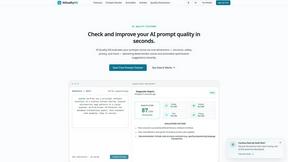
AIQualityHQ is a free, privacy-first tool that evaluates and improves AI prompts instantly across six key dimensions using a deterministic local.
Bulker
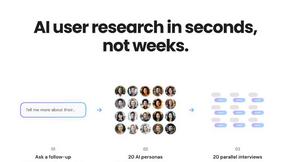
Bulker delivers rapid user insights through AI personas, enabling you to ask questions and receive detailed, visualized reports in seconds.
Microplastic Intake App
This app helps you track your daily microplastic intake from food, drinks, and activities using research-backed data.
Spindex
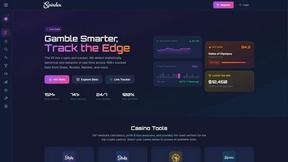
Spindex is a real-time crypto slot tracker that analyzes millions of bets to identify hot slots and optimize your gaming strategies.