
Sprite-AI
Sprite-AI turns your text descriptions into pixel-perfect game sprites in seconds, with no drawing skills needed.
Visit
About Sprite-AI
Sprite-AI is an AI-powered pixel art generator built specifically for indie game developers, hobbyists, and prototypers who need high-quality 2D assets rapidly. The core function of the platform is simple: users describe a sprite in plain English, and the application produces a clean, game-ready pixel art image. The output is available in standard sizes of 32x32, 64x64, or 128x128 pixels, and the AI intelligently sizes the sprite for its intended role, whether that be an icon, item, character, hero, or boss art. Beyond generation, Sprite-AI includes a built-in pixel editor that allows users to paint, erase, fill, and color-pick to fine-tune every detail. The final asset can be exported as a transparent PNG that integrates directly into popular game engines like Unity, Godot, GameMaker, and Unreal. The platform also features a community gallery for inspiration, prompt guides to help users craft better descriptions, and a token-based pricing model where users only pay for what they generate. This tool eliminates the need for drawing skills, making game asset creation accessible to anyone with a clear idea.
Features of Sprite-AI
AI-Powered Generation from Text Prompts
The central feature of Sprite-AI is its ability to convert plain English descriptions into pixel art sprites. Users type what they imagine, such as "fire-breathing dragon, red scales" or "medieval knight with sword and shield," and the AI interprets the request to generate a sprite that matches the description. This process takes seconds, removing the traditional barrier of requiring artistic skill to create game assets. The AI understands context for different roles, automatically sizing the output appropriately for icons, items, characters, or boss art, ensuring the sprite is ready for immediate use in a game project.
Integrated Pixel Editor for Refinement
Once a sprite is generated, users are not locked into the AI's output. Sprite-AI includes a built-in pixel editor that provides intuitive tools for manual refinement. Users can paint individual pixels, erase unwanted elements, fill areas with color, and use a color-picker to match specific hues from the existing sprite. This feature allows for precise control over the final look, enabling developers to tweak colors, fix small details, or add their own creative touches. The editor is designed to feel like magic, offering simple yet powerful functionality that complements the AI generation process.
Seamless Game Engine Export
Sprite-AI is designed with game development workflows in mind. Generated and edited sprites can be exported as transparent PNG files, which are the standard format for 2D game assets. These files drop straight into major game engines including Unity, Godot, GameMaker, and Unreal without any conversion or additional processing. The export process preserves the pixel-perfect quality of the sprite, ensuring that the asset looks exactly as intended within the game environment. This seamless integration saves developers significant time by eliminating the need for post-processing or format adjustments.
Community Gallery and Prompt Guides
To support users in creating better sprites, Sprite-AI offers a community gallery where generated sprites are displayed. This gallery serves as a source of inspiration, showcasing what is possible with different prompts and styles. Users can browse through examples like "cute slime monster green and blue" or "golden magic lamp with sparkles" to see how descriptions translate into art. Additionally, the platform provides prompt guides that teach users how to write effective descriptions for the AI. These guides help users understand which keywords and structures produce the best results, improving the quality and relevance of generated sprites.
Use Cases of Sprite-AI
Rapid Prototyping for Game Jams
Game jams require participants to create a playable game in a very short timeframe, often 48 to 72 hours. Sprite-AI is ideal for this scenario because it allows developers to generate all necessary 2D assets in minutes rather than hours. A developer can quickly describe a player character, enemies, items, and background elements, receive game-ready sprites, and then focus on coding and gameplay mechanics. The ability to export directly to Unity or Godot further accelerates the prototyping process, making it feasible to complete a polished game within the jam's constraints.
Indie Game Development with Limited Art Resources
Many indie game developers work solo or in small teams without dedicated artists. Sprite-AI solves this problem by acting as an on-demand art department. Developers can describe the exact assets they need for their game, such as a "wizard staff with magical crystal" or "skeleton with shield bone armor," and receive sprites that fit their game's visual style. The pixel editor allows for minor adjustments to ensure consistency across all assets. This use case is particularly valuable for developers who have strong game design ideas but lack the technical drawing skills to realize them visually.
Creating Asset Packs for Sale or Distribution
Asset creators and publishers can use Sprite-AI to generate large volumes of pixel art for asset packs. By describing variations of characters, items, and environments, creators can quickly build a diverse library of sprites. The token-based pricing model makes this cost-effective, as creators only pay for the sprites they generate. Once created, these sprites can be refined in the pixel editor, exported as transparent PNGs, and packaged for sale on asset stores or shared with the community. The community gallery also provides a platform for showcasing these packs and attracting potential buyers.
Educational Projects and Student Game Development
Students learning game development or computer science can use Sprite-AI to create assets for their projects without needing art training. In a classroom setting, students can focus on programming concepts while the AI handles the visual elements. For example, a student building a platformer can generate a "ninja with spiky yellow hair" for the player character and "gold coin shiny pixel art" for collectibles. This lowers the barrier to entry for game development education, allowing students to create more polished and complete projects within the constraints of a semester or course.
Frequently Asked Questions
What sizes of sprites can Sprite-AI generate?
Sprite-AI can generate pixel art in three standard sizes: 32x32, 64x64, and 128x128 pixels. The AI automatically selects the appropriate size based on the role you specify for the sprite, such as an icon, item, character, or hero/boss art. You can also manually choose the size during generation if you have specific requirements for your game project.
Can I edit the sprites after they are generated?
Yes, every sprite generated by Sprite-AI can be edited using the built-in pixel editor. This editor includes tools for painting individual pixels, erasing unwanted areas, filling contiguous regions with color, and using a color-picker to sample and apply existing colors from the sprite. This allows you to fine-tune details, adjust colors, or add personal touches before exporting.
Which game engines are compatible with exported sprites?
Sprites exported from Sprite-AI are transparent PNG files, which are compatible with all major game engines. The platform specifically mentions compatibility with Unity, Godot, GameMaker, and Unreal Engine. The PNG format is a universal standard for 2D game assets, so the sprites will work in any engine that supports this file type, including custom or less common engines.
How does the token-based pricing model work?
Sprite-AI uses a token-based pricing model where you only pay for the sprites you generate. The platform offers subscription plans that include a set number of sprites per month. For example, the Starter plan includes 8 sprites per month, the Creator plan includes 20, and the Studio plan includes 75. If you need more sprites in a month, you can upgrade your plan or purchase additional tokens. This model ensures you are not paying for unused capacity.
Pricing of Sprite-AI
Sprite-AI offers three subscription tiers with a launch pricing discount of 38 percent on the Creator and Studio plans. The Starter plan costs $5 per month and provides 8 game-ready sprites, suitable for game jams and side projects. The Creator plan is priced at $8 per month (discounted from $13) and includes 20 unique sprites, PNG and SVG export, private art options, and uncensored generations for indie developers. The Studio plan costs $24 per month (discounted from $39) and includes 75 sprites per month for teams and serious production. All plans allow cancellation at any time, and the discount locks in the price forever. There are currently 386 out of 500 spots remaining for the launch pricing.
Similar to Sprite-AI
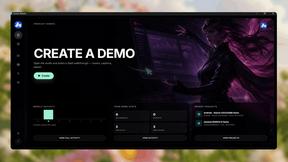
Screen Beaver
Create product videos manually or let your AI agent control Screen Beaver through MCP—no mouse or keyboard needed.

DigiCakey
Create and send personalized digital cakes with custom frosting, fruit, candles, cards, and drawings.


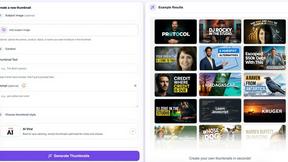
StopScroll
AI YouTube thumbnail maker that helps creators generate high-click thumbnails faster.
HubVanta AI
HubVanta AI helps creators generate images and videos with advanced AI tools for visual content workflows.

CustomTattoo AI
CustomTattoo AI lets you generate, preview, and refine custom tattoo designs on your own skin before booking with your artist.

Inkfox AI
Inkfox AI is a free unlimited image generator with no sign-up required, offering premium models like Flux and Seedream for creating ads, product.