
retroshelf
Retroshelf automatically logs your retro handheld gaming sessions and lets you discover trends and connect with fellow players.
Visit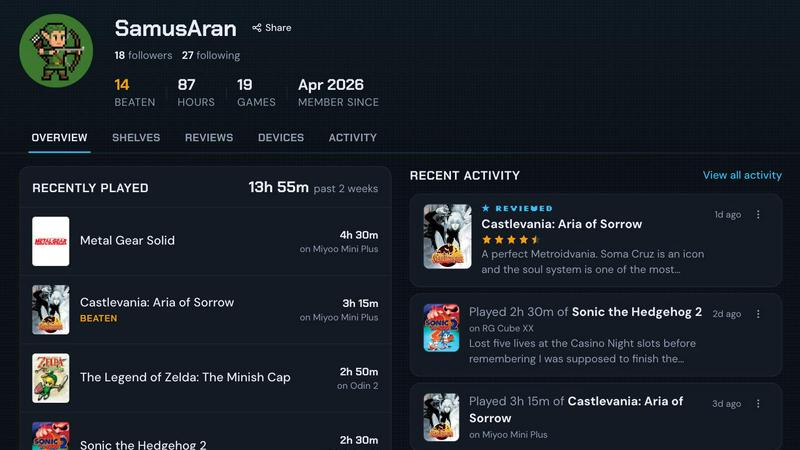
About retroshelf
retroshelf is a specialized play-tracking and discovery application built exclusively for the retro handheld gaming community. It solves a fundamental problem that dedicated handheld gamers face: the difficulty of remembering and organizing what they play across multiple devices, platforms, and sessions. Instead of relying on scattered notes, spreadsheets, or memory, retroshelf provides a centralized, automated solution that logs every gaming session as it happens. A tiny, lightweight plugin runs directly on your retro handheld device, capturing essential metadata such as the game title, playtime duration, and the specific handheld used. This data is then synced to your personal public shelf, which displays your current games, completed titles, reviews, and replays in a clean, browsable timeline. The product is designed for enthusiasts who use custom firmware like muOS and OnionOS on devices from manufacturers such as Miyoo, Anbernic, and Odin. Beyond personal tracking, retroshelf fosters community discovery by allowing users to browse what others are playing, finishing, and replaying. Each game page shows who is playing it, on which handheld, and for how long, providing authentic context for reviews and recommendations. The platform is currently in a closed beta phase, inviting early adopters to help shape the community and feature set from the ground up.
Features of retroshelf
Automatic Session Logging
A tiny, non-intrusive plugin runs directly on your retro handheld device and captures every gaming session automatically. There is no need to manually start or stop timers. The plugin records the game title, the exact playtime in minutes, and the specific handheld device you are using. This data syncs seamlessly to your retroshelf profile, ensuring your gaming history is always up to date without any effort on your part.
Public Shelf with Device Context
Your personal shelf is a public, curated display of your gaming activity. It organizes your sessions into clear categories: currently playing, finished, reviewing, and replaying. Crucially, every entry retains device context, meaning viewers can see not just what game you played, but on which specific handheld (Miyoo Mini, Anbernic RG35XX, Odin 2, etc.) you experienced it. This adds a layer of authenticity and detail that standard game tracking services lack.
Comprehensive Gaming Timeline
retroshelf transforms scattered sessions across multiple handhelds into a single, coherent, and browsable timeline. You can look back at your entire year of play, filter by device or game, and see exactly when and for how long you played each title. This feature turns your gaming history into a visual narrative, allowing you to reflect on your habits, discover patterns, and remember specific moments from your gaming journey.
Community Discovery and Contextual Reviews
The platform enables you to find new games by exploring the real shelves of other players. You can see which titles are popular this week, what people are picking up, finishing, and replaying right now. Reviews on retroshelf are not just star ratings; they come with the specific handheld context in which the game was played. This helps you understand whether a game performs well on a device you own, making recommendations far more useful and actionable.
Use Cases of retroshelf
Tracking Your Entire Handheld Collection
If you own multiple retro handhelds, such as a Miyoo Mini for on-the-go play and an Anbernic RG556 for longer sessions at home, retroshelf unifies your play history. Instead of trying to remember which game you were playing on which device, the platform automatically logs everything. You can see a single timeline showing your progress across all devices, making it easy to pick up where you left off regardless of which handheld you grab.
Discovering Games Based on Real Play Data
When you are looking for your next game to play, you can browse retroshelf to see what other handheld enthusiasts are actually playing and enjoying. The "Popular this week" section shows real-time trends of what the community is picking up, finishing, and replaying. You can also filter by specific device types, allowing you to find games that are known to run well on your particular hardware, saving you time and frustration.
Writing and Reading Contextual Reviews
For players who enjoy sharing their opinions, retroshelf allows you to leave star ratings and notes on games you have finished. The key differentiator is that your review is permanently tied to the handheld you played the game on. This is invaluable for other users who want to know, for example, how a PlayStation Portable game performs on an Odin 2 versus a Retroid Pocket 4 Pro. It turns reviews from simple numbers into useful, hardware-specific insights.
Building and Sharing Your Gaming Identity
Your public shelf acts as a living portfolio of your gaming tastes and habits. You can share your profile with friends or on social media to show what you are currently playing, what you have completed, and what you are replaying. This creates a unique, authentic way to connect with other retro gaming enthusiasts, start conversations about specific titles, and discover like-minded players based on their actual play history rather than just their stated preferences.
Frequently Asked Questions
How does the automatic logging plugin work on my handheld?
The plugin is a small, lightweight file that you drop onto your handheld's SD card. It integrates with custom firmware such as muOS and OnionOS. When you launch a game, the plugin silently starts tracking the session. When you exit, it logs the game title, the duration of the session in minutes, and the device identifier. The next time your handheld connects to the internet, this data is synced to your retroshelf account automatically.
Which devices and firmware are currently supported by retroshelf?
During the closed beta, retroshelf officially supports devices running muOS and OnionOS. These are two of the most popular custom firmware options for retro handhelds. The platform is designed to be device-agnostic, meaning it works with handhelds from manufacturers like Miyoo, Anbernic, Odin, Retroid Pocket, and others, as long as they are running one of the supported firmware versions. Support for additional firmware is planned for future releases.
Is my gaming shelf private or public by default?
Your shelf is public by default, which is a core feature of the community discovery aspect of retroshelf. The idea is that by sharing what you play, you help others find great games and build a richer, more transparent community. However, you have control over what is displayed. You can choose to hide specific sessions or games from your public profile if you prefer to keep certain play habits private.
How can I join the retroshelf closed beta?
retroshelf is currently in a closed beta phase. You can join the waitlist by visiting the retroshelf website and clicking the "Join beta" button. The team is opening access in small waves to ensure a high-quality experience and to gather focused feedback from early adopters. If you are already a beta user, you can sign in directly. Being an early adopter gives you the opportunity to help shape the community and feature set from the very beginning.
Explore more in this category:
Similar to retroshelf

Caesura
Caesura is a macOS menu-bar app that reminds you to drink water, stretch, rest your eyes, and breathe on science-backed intervals.

PrettyScale
PrettyScale offers a suite of free, private AI beauty tools that run instantly in your browser with no uploads or account needed.

Burge Coffee
Burge Coffee is a free, no-account home roasting guide with tools, roaster maps, and stories for coffee obsessives.
On Music AI
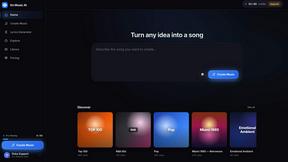
On Music AI transforms text or lyrics into complete songs with vocals, beats, and instrumentals, offering free creation tools for any genre.

Bloom Plant ID
Bloom Plant ID uses AI to identify plants, diagnose diseases, and send personalized care reminders for healthier growth.
HavenBook
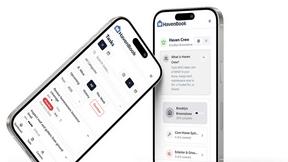
HavenBook offers personalized home maintenance tasks and reminders to help you protect your investment and prevent costly repairs.
NinjaHackz
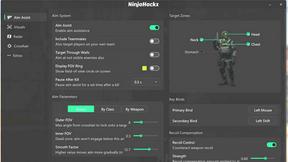
NinjaHackz offers effortless, portable CS2 cheats with aimbot, wallhack, and customizable features for a seamless gaming experience.

True Moments
True Moments animates your photos in seconds, allowing you to relive and share cherished memories like never before.