
xyOps
xyOps is a next-generation workflow automation system that lets you schedule, monitor, and manage jobs across your entire infrastructure from one.
Visit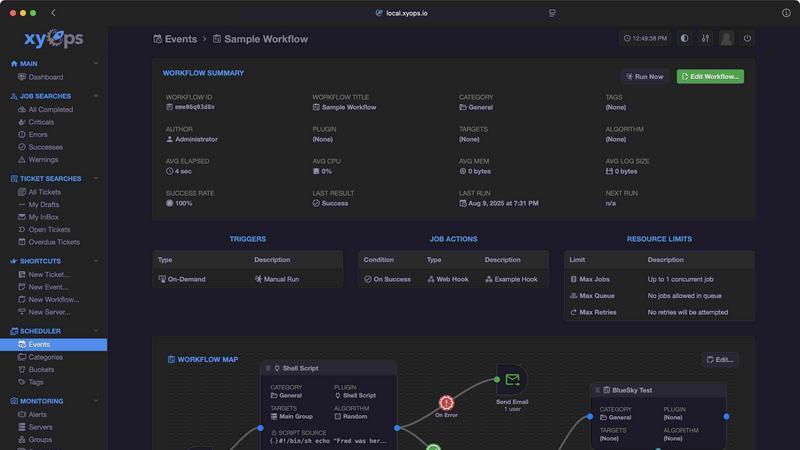
About xyOps
xyOps is a next-generation, open-source platform that consolidates job scheduling, workflow automation, server monitoring, alerting, and incident response into a single, cohesive system. Designed for developers and operations teams, xyOps provides complete control over your automation stack without sacrificing data privacy, operational freedom, or visibility. Unlike many modern tools, xyOps does not hide features behind paywalls or push telemetry back to its creators. It is built to be open, extensible, and capable of running anywhere, from a single server to a fleet of thousands. The platform offers a visual workflow builder for creating complex pipelines with conditional logic, a flexible job scheduler that goes far beyond traditional cron, real-time job tracking with resource limits, comprehensive server monitoring dashboards, and a smart alerting system that can trigger tickets or automated actions. xyOps also includes an integrated ticketing system for incident response, a plugin marketplace with both official and community contributions, and support for writing plugins in any language using a simple JSON over STDIO API. The entire platform is licensed under the BSD 3-Clause license, ensuring maximum flexibility for both personal and commercial use. With its focus on scalability, developer-friendliness, and simple setup, xyOps empowers teams to orchestrate their entire infrastructure efficiently and reliably.
Features of xyOps
Visual Workflow Builder
The visual workflow builder allows users to chain multiple jobs together with conditional logic, passing data and even files between workflow steps. Users can assign actions to specific events, such as sending notifications or triggering webhooks. The builder also supports attaching limiters like timeouts, memory caps, and log size caps to each step. Workflows can run jobs in parallel or utilize custom queues, giving teams precise control over execution order and resource allocation.
Flexible Job Scheduler
xyOps reimagines job scheduling with capabilities far beyond traditional cron. Users can target individual servers or entire groups, set multiple schedules per event, and define blackout ranges for holidays or planned downtime. The scheduler supports crontab import for easy migration, one-time jobs for single-shot tasks, and plugin-based scheduler extensions for custom scheduling logic. This flexibility ensures that any recurring or ad-hoc task can be precisely timed and executed.
Active Job Tracking
The active job tracking feature enables users to run any number of jobs in parallel while optionally setting a maximum parallel limit and queuing the rest. Real-time progress updates, including time remaining, provide full visibility into job execution. Users can enforce resource limits such as CPU and memory usage per job, and jobs can emit their own progress and statistics. Custom actions can be triggered based on job results, enabling automated responses to success, failure, or other outcomes.
Smart Alerts and Monitoring
xyOps provides comprehensive server monitoring with server and group-level dashboards, custom monitors, and alerts. The system tracks CPU, memory, network, disk, and log usage per job, and supports running custom commands to gather unique metrics. Historical performance graphs are available from hourly to yearly views. The smart alerting system uses trigger expressions with flexible rules and supports email, webhook, and custom notifications. All alerts include a server snapshot, and they can automatically create tickets or run jobs, while active alerts can prevent new jobs from launching.
Use Cases of xyOps
Automating Complex CI/CD Pipelines
Development teams can use xyOps to build and automate complex CI/CD pipelines that span multiple servers and environments. The visual workflow builder allows chaining of build, test, and deployment jobs with conditional logic based on success or failure. For example, a workflow can automatically run unit tests after a successful build, deploy to a staging server if tests pass, and send a notification to the team with results. The ticketing system can create tickets for failed builds, ensuring issues are tracked and addressed promptly.
Managing Scheduled Maintenance and Backups
Operations teams can schedule recurring maintenance tasks, such as database backups, log rotation, and system updates, across a fleet of servers. The flexible job scheduler allows setting different schedules for different server groups, with blackout ranges to avoid maintenance during peak hours. Active job tracking provides real-time visibility into backup progress and resource usage, while alerts can notify administrators if a backup fails or exceeds expected duration. Historical performance graphs help in analyzing backup trends and optimizing schedules.
Real-Time Server Monitoring and Incident Response
xyOps enables teams to monitor server health in real-time, with custom monitors for CPU, memory, disk, and network usage. When a metric exceeds a defined threshold, smart alerts can trigger multiple actions, such as sending an email to the on-call engineer, creating a ticket in the integrated ticketing system, or automatically running a remediation job. The alert includes a snapshot of the server at the time of the incident, providing context for faster troubleshooting. Active alerts can also prevent new jobs from launching on affected servers, preventing further load.
Orchestrating Data Processing Workflows
Data engineering teams can use xyOps to orchestrate complex data processing workflows that involve multiple steps, such as data ingestion, transformation, and loading into databases or data lakes. The workflow builder allows passing data and files between steps, with limiters to control memory and log sizes. Parallel execution can speed up processing, while custom queues ensure orderly handling of high-volume data. The plugin marketplace provides ready-made integrations with services like AWS S3 and Google Sheets, simplifying connectivity to external data sources.
Frequently Asked Questions
Is xyOps truly free and open source?
Yes, xyOps is 100% free and open source under the BSD 3-Clause license. The license will never be modified, split, or amended with additional restrictive terms. No new code or contributions will ever be accepted under a non-OSI-approved license. All current and future app features will remain open source forever. Professional and enterprise support plans are available separately for those who need them.
What platforms does xyOps support for agents?
xyOps agents can be easily installed on macOS, Linux, and Windows operating systems. The platform is designed to scale from a single server to thousands of worker servers in a cluster. Server grouping can be done manually or automatically based on hostname, making it simple to manage fleets of any size.
Can I write custom plugins for xyOps?
Yes, xyOps supports writing plugins in any language using a simple JSON over STDIO Plugin API. No SDK is required, and all programming languages are supported. Users can define custom parameters with UI form fields for easy configuration. Multiple plugin types are available, including Event, Action, Monitor, and Trigger plugins. Published plugins can be shared through the Plugin Marketplace.
How does xyOps handle high availability and redundancy?
xyOps supports running multiple hot backups that can take over immediately in case of a power loss or primary server failure. No jobs are interrupted during a primary failover, ensuring continuous operation. The platform scales to thousands of worker servers in your cluster, and agents can be installed on all major operating systems. This architecture provides robust redundancy for mission-critical automation.
Similar to xyOps

iHatePosting
Social media scheduler to create once, customize per platform, and publish across 14 networks from one dashboard.

Wisegrid
Wisegrid helps project-driven teams manage projects, workflows, resources, and reporting in a familiar spreadsheet-style workspace.

Postqued
Schedule and publish social content across 10 platforms with one dashboard, API, and MCP built for teams and AI agents.

Groniz
Run your social media on autopilot with AI agents. Post & schedule to 32+ networks from Claude Code, Codex, or Console.

EchoLeads AI
EchoLeads AI uses intelligent voice agents to automate cold calling, lead qualification, and appointment scheduling across multiple channels.

Minded
Minded lets you record tasks once to train AI agents that automate your workflows using natural language.

YCaaS
YCaaS deploys AI agents to handle every role in your workflow, delivering end-to-end automation without human intervention.