
ProcessSpy
ProcessSpy is an advanced process monitor for Mac, providing detailed insights and real-time analysis of system processes effortlessly.
Visit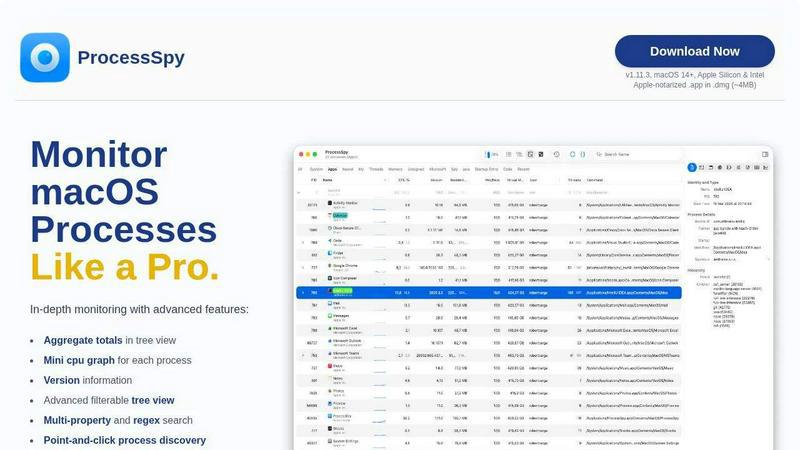
About ProcessSpy
ProcessSpy is a powerful process monitoring tool designed for macOS, offering users a comprehensive alternative to the built-in Activity Monitor. Unlike traditional process management utilities, ProcessSpy empowers developers and power users with advanced features that reveal in-depth details about running processes. By utilizing native macOS APIs and UI elements, it delivers a fast, responsive experience that seamlessly integrates with the operating system. Users can visualize process trees, inspect open files, view environment variables, and terminate unresponsive applications with ease. With its unique ability to display full command-line arguments and version information, ProcessSpy is ideal for users who need to manage multiple applications and their dependencies, such as developers working with various Java applications. Its focus on performance and usability makes ProcessSpy an essential tool for anyone looking to gain deeper insights into their system's processes.
Features of ProcessSpy
Advanced Tree View
ProcessSpy features a detailed tree view that enhances users' ability to monitor processes in real-time. This view allows for immediate filtering and searching, including advanced JavaScript filters. Additionally, it displays aggregate totals for CPU, memory, and thread usage, making it easier to identify resource-intensive applications at a glance.
JavaScript Filters
The tool provides users with the ability to define complex filters using JavaScript, enabling them to create multi-condition queries. This feature allows for precise monitoring tailored to specific requirements, ensuring that users can focus on the processes that matter most to them without unnecessary distractions.
Process History Recording
With ProcessSpy's paid feature, users can record historical values for CPU, memory, and thread usage. This functionality not only helps track resource utilization over time but also allows for exporting results to CSV for further analysis, making it a valuable feature for performance monitoring.
Remember Finished Processes
ProcessSpy has a unique capability to remember finished processes along with their command-line arguments and environment variables. This feature is particularly useful for users who need to review past processes and their behaviors, providing insights into application performance and helping troubleshoot issues effectively.
Use Cases of ProcessSpy
Monitoring Development Environments
Developers working on multiple applications can use ProcessSpy to track process performance in development environments. By providing detailed insights into running Java applications and their respective JDK versions, it helps developers optimize their workflows and troubleshoot issues effectively.
Diagnosing Performance Issues
When experiencing system slowdowns or application crashes, users can leverage ProcessSpy to identify problematic processes consuming excessive resources. The advanced filtering options allow for a focused investigation, making it easier to diagnose and address performance issues.
Managing Background Services
System administrators can utilize ProcessSpy to keep tabs on background services and daemons. With features like the ability to view startup entries and monitor resource usage, administrators can ensure that essential services are running smoothly and efficiently.
Education and Training
ProcessSpy can serve as an educational tool for those learning about macOS internals and process management. By providing insights into how processes operate and interact with system resources, it offers a practical way for students and new users to understand macOS functionality.
Frequently Asked Questions
Is ProcessSpy safe to install on my Mac?
Yes, ProcessSpy is Apple-notarized and distributed as a signed application within a DMG file. It is verified and safe to use on both Intel and Apple Silicon Macs, ensuring users can install it without security concerns.
Does ProcessSpy support older versions of macOS?
ProcessSpy is designed specifically for macOS 14 and newer versions. It does not support older versions, so users should ensure their systems are up to date for compatibility.
What is the license model?
The license for ProcessSpy is valid for one user across unlimited devices. It includes lifetime updates and access to new features, making it a worthwhile investment for users looking for ongoing enhancements.
How does ProcessSpy compare to Activity Monitor?
ProcessSpy significantly outperforms Activity Monitor by providing detailed command-line information, distinguishing between processes with the same name, and offering advanced filtering options. Additionally, it includes features to record process history and remember finished processes, which are not available in Activity Monitor.
Similar to ProcessSpy

StackLedge
A human-verified discovery hub for founders. Find dependable SaaS tools, practical AI apps, and custom n8n workflows without enterprise bloat.

WidgIq
Provide an AI-powered customer support widget for your website

Product Launch Checklist
A free launch checklist for SaaS, apps, AI tools and more. Every step says why it matters and when you can skip it.

Forms Plugin
The #1 Native Form Builder Plugin for Framer - No Code, No Embeds, No External Platforms.

Chatit Me - Free Random Chat Alternative
Chat with random strangers online for free on ChatIt.me. Enjoy safe, anonymous, and instant 1-on-1 conversations with people worldwide

AkraLabs
Where modern software products get discovered, launched, and distributed. Explore verified AI tools, SaaS startups, and developer software.


Screen Beaver
Create product videos manually or let your AI agent control Screen Beaver through MCP—no mouse or keyboard needed.