
BlueHumanizer
BlueHumanizer transforms AI-generated text into clear, natural writing with one click, preserving meaning and tone for free.
Visit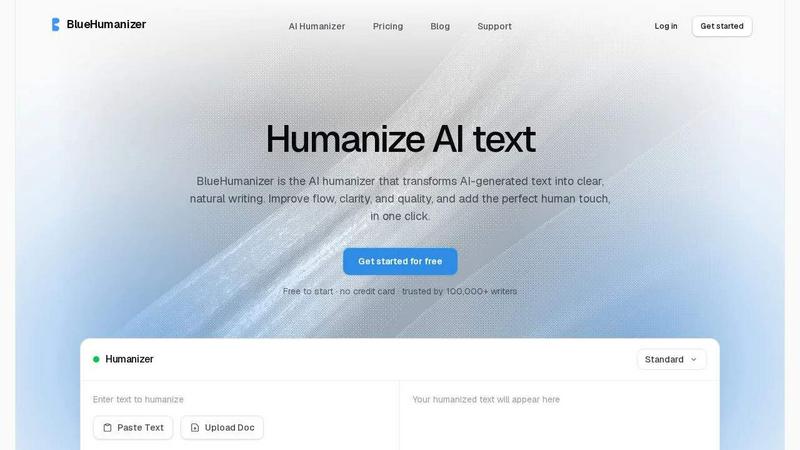
About BlueHumanizer
BlueHumanizer is an advanced AI humanization tool designed to transform AI-generated text into clear, natural, and polished writing with a single click. It accepts input from popular AI writing tools such as ChatGPT, Claude, Gemini, and others, and rewrites the content into prose that reads as if written by a human. Unlike basic synonym-swapping tools, BlueHumanizer reshapes sentence structure, restores natural rhythm, and improves flow while preserving the original meaning, tone, and key points. Quotes, citations, and references remain untouched during the rewriting process, making it suitable for academic and professional use. The tool supports over 50 languages with automatic detection, offers adjustable humanization strength levels, and provides tone controls to match specific writing styles. BlueHumanizer is built for a diverse audience, including students refining essays, researchers polishing academic papers, marketers creating on-brand copy, non-native English speakers improving fluency, and bloggers maintaining consistent content output. It is free to start with no credit card required, and is trusted by over 100,000 writers worldwide. The platform emphasizes ease of use, requiring no setup or learning curve, and delivers ready-to-publish writing that feels authentic and engaging.
Features of BlueHumanizer
Humanize AI Text in One Click
BlueHumanizer simplifies the rewriting process by allowing users to copy and paste AI-generated text directly into the interface and receive humanized output instantly. There is no complex setup, no learning curve, and no need for manual editing. This feature is designed for efficiency, enabling writers to transform stiff AI output into clear, polished prose in seconds. The tool handles text from any AI writer, including ChatGPT, Claude, and Gemini, and outputs writing that flows naturally and reads smoothly. This one-click functionality is ideal for busy professionals and students who need quick, reliable results without sacrificing quality.
Clearer and Smoother Writing
BlueHumanizer goes beyond basic word replacement by tightening phrasing, varying sentence rhythm, and improving overall flow. The result is writing that reads smoothly and naturally, without altering the original message. It reduces redundancy, eliminates awkward phrasing, and enhances readability, making the text suitable for publication. This feature ensures that the output is not only human-like but also engaging and easy to follow. Whether the input is a dense academic paragraph or a promotional email, BlueHumanizer refines it into polished prose that retains the author's intent while sounding more conversational and fluid.
Keeps Your Intent and Tone Intact
One of BlueHumanizer’s standout capabilities is its ability to preserve the original tone, intent, and key points of the input text. While other tools may strip away nuance or change the meaning, BlueHumanizer carefully rewrites the content to maintain its core message and stylistic voice. Users can also adjust tone controls to match specific requirements, such as casual, professional, or academic styles. This feature is particularly valuable for marketers who need to maintain brand voice and for academics who require precise language. The tool ensures that the humanized output aligns with the writer’s original goals, making it reliable for sensitive or high-stakes content.
Keeps Citations and Quotes Untouched
BlueHumanizer automatically detects and preserves quotes, citations, and references within the text. These elements remain exactly as they were in the original input, while the surrounding writing is rewritten for clarity and flow. This feature is critical for researchers, students, and academics who rely on accurate citations to maintain credibility and avoid plagiarism. By protecting these elements, BlueHumanizer ensures that the humanized output is both polished and academically sound. This attention to detail sets it apart from other tools that may inadvertently alter or remove important references, making it a trustworthy choice for scholarly work.
Use Cases of BlueHumanizer
Refining Academic Essays and Assignments
Students can use BlueHumanizer to refine AI-assisted drafts of essays and assignments into clear, well-structured writing that flows naturally. The tool helps eliminate robotic phrasing and improves sentence variety, making the content more engaging for instructors. It also preserves citations and academic tone, ensuring that the final submission meets scholarly standards. This use case is ideal for students who want to leverage AI for initial drafts but need humanized output to avoid detection and improve readability. BlueHumanizer saves time on editing while enhancing the overall quality of academic work.
Polishing Research Papers and Abstracts
Researchers and academics can humanize AI-drafted papers and abstracts into clear, natural prose while keeping every citation and reference intact. The tool improves flow and clarity, making complex scientific language more accessible without sacrificing accuracy. This is especially useful for preparing manuscripts for journal submission, conference presentations, or grant proposals. BlueHumanizer ensures that the writing reads as if crafted by a human expert, increasing the likelihood of acceptance and reader engagement. It also supports multiple languages, aiding international researchers in producing fluent English text.
Creating On-Brand Marketing Copy
Marketers and content teams can ship blog posts, emails, and landing page copy that reads clearly and matches the tone of their brand. BlueHumanizer’s tone controls allow users to adjust the output to be casual, professional, or persuasive, ensuring consistency across all channels. The tool refines AI-generated drafts into polished, engaging content that resonates with target audiences. This use case helps marketing teams maintain high-quality output while saving time on manual editing. By humanizing AI text, BlueHumanizer enables faster content production without compromising brand voice or messaging.
Improving English Fluency for Non-Native Writers
Non-native English speakers can use BlueHumanizer to make their AI-generated English flow naturally, so their writing reads as fluent and effortless. The tool corrects awkward phrasing, improves sentence structure, and adjusts word choice to sound more native. This is particularly valuable for international students, professionals, and entrepreneurs who need to communicate effectively in English. BlueHumanizer supports over 50 languages, allowing users to input text in their native language and receive humanized English output. This feature builds confidence and enhances the quality of written communication in academic, professional, and personal contexts.
Frequently Asked Questions
How does BlueHumanizer differ from basic synonym-swapping tools?
BlueHumanizer goes beyond simple word replacement by reshaping sentence structure, varying rhythm, and improving overall flow. While basic tools only swap words for synonyms, BlueHumanizer rewrites text the way a person would, resulting in natural, polished prose. It also preserves meaning, tone, and citations, making it suitable for academic and professional use. The tool offers adjustable humanization levels and tone controls, providing more flexibility and higher quality output than standard alternatives.
Is BlueHumanizer free to use?
Yes, BlueHumanizer is free to start with no credit card required. Users can humanize AI-generated text without any upfront cost. The platform is designed to be accessible to everyone, including students, researchers, and marketers. While there may be premium features or usage limits for advanced needs, the basic humanization functionality is available at no charge, making it easy for new users to test the tool and see results immediately.
Does BlueHumanizer support multiple languages?
Yes, BlueHumanizer supports over 50 languages with automatic detection and natural, human-sounding output. Users can input text in various languages, and the tool will process it accordingly, producing fluent and polished results. This feature is particularly beneficial for non-native writers and international teams who need to create content in multiple languages. The language support ensures that writers from different regions can rely on BlueHumanizer for consistent, high-quality humanization.
Can BlueHumanizer handle academic citations and references?
Absolutely. BlueHumanizer is designed to keep quotes, citations, and references untouched during the rewriting process. Only the surrounding writing is modified for clarity and flow, ensuring that all academic elements remain accurate and intact. This makes the tool ideal for researchers, students, and academics who need to maintain proper attribution while improving readability. BlueHumanizer’s attention to citation preservation sets it apart as a reliable choice for scholarly work.
Pricing of BlueHumanizer
BlueHumanizer offers a free tier that allows users to humanize AI-generated text without any cost or credit card requirement. The platform is designed to be accessible, with no upfront fees for basic usage. For users who need advanced features such as higher word limits, additional tone controls, or priority support, premium plans may be available. Specific pricing details for paid tiers are not provided in the available context, but the free option ensures that anyone can start using BlueHumanizer immediately. Trusted by over 100,000 writers, the tool provides value for both casual and professional users.
Similar to BlueHumanizer




ContextBolt SEO
Research keywords, competitors, backlinks and AI visibility in Claude or Codex. Keep the findings in your SEO dashboard.


Built2WinWeb AI SEO
Custom PHP websites, AI Indexing Pack ($599 one‑time), and WebAgentScan SaaS ($9/mo). MCP, A2A, llms.txt, full ownership.